

Import a recipe from the web
BrightDish can import recipes from 1,000+ popular websites. Ingredients, steps, photos, and even (when available) sections and nutritional info come along.
Import from Safari
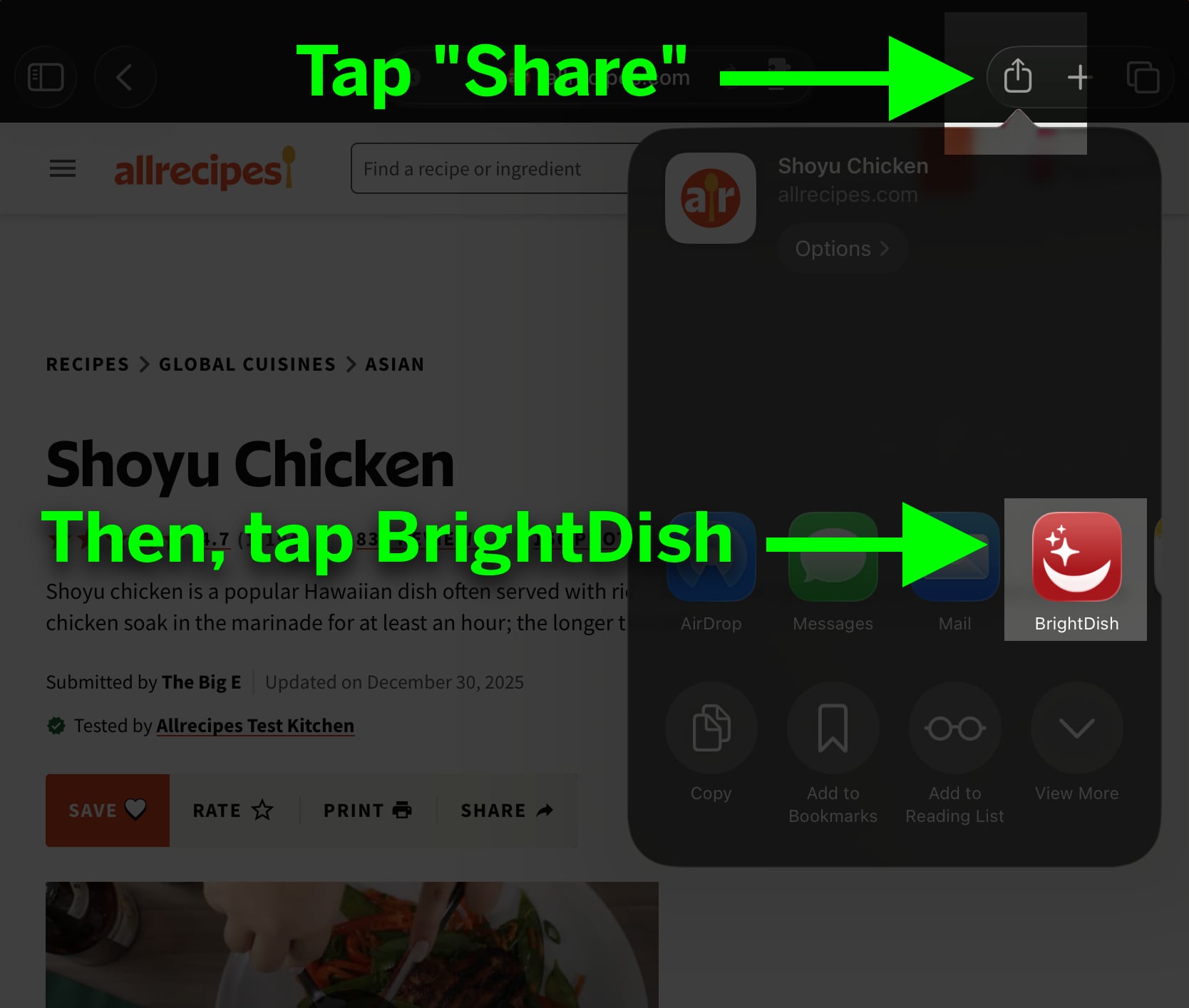
This is the most reliable way to import recipes from the web. Open any recipe page in Safari, then:
- Tap the
Sharebutton. - In the popover, tap the
BrightDishicon.
Import with a URL
- Copy the URL of a recipe page.
- In BrightDish, tap
Import Recipe. - Paste the URL into the textfield.
BrightDish Safari Extension
BrightDish includes an optional Safari Extension (disabled by default) that adds a BrightDish button to the Safari toolbar. This button does the same thing as tapping Share > BrightDish, but is slightly more convenient if you import recipes frequently. You can enable this Extension in the system Settings app, under Apps > Safari.
If a site doesn’t import cleanly
Most websites publish recipes in a standard format that BrightDish can read. A few sites use custom layouts that don’t expose the recipe in a machine-readable way. Those won’t import.
When that happens, you have two options:
- Add the recipe by hand.
- Send us the URL at [email protected] and we'll try to add support for the site.